

TL;DR
- On November 17 Google opened up Tasks in Gemini, the mode where the assistant does things for you. One of those things is calling businesses to ask questions or book.
- The call opens with a line your front desk has probably never heard: an AI assistant from Google, on a recorded line, calling for someone by name.
- Some things that assistant can't say over the phone, like health or payment details. If your booking depends on them, it stalls.
- Your Google Business Profile also has three toggles that decide whether Google calls your practice for patients, to confirm your details, or to post updates to your listing.
- The one thing this week: write the four-line note and tape it next to the front-desk phone.
The short answer. Google's Gemini assistant can call a dental office on a patient's behalf to check hours or book an appointment, according to Google. It introduces itself as an AI on a recorded line, it can't share health or payment details, and for now it calls from Pixel phones set to English. A practice that knows how to handle that call, and has checked its Google profile settings, won't lose the appointment by surprise.
First, some perspective: this isn't a fleet of robots ringing your office all day. For Gemini calls, Google caps how many each user can place in a day. For its other automated calls, it says it limits repeats and avoids late-night and early-morning hours. What changes is smaller and more specific. Some calls are going to start differently, and whoever picks up has a few seconds to decide whether it's a prank, a sales pitch, or a patient who didn't make the call themselves.
Yesterday we wrote about the questions your customers already ask and what AI does with them. Today the question doesn't arrive in writing. It arrives by phone, and an assistant is the one asking.
1. Google is already showing Gemini calling businesses to land an appointment
Google announced on November 17 that Tasks in Gemini is now free in the US, Japan, Korea, Canada, Australia and India, with advanced features starting in the US. In the announcement's own example, someone asks Gemini to call the two nearest car dealerships for an early Friday service slot. Gemini finds them on Google Maps, calls both, sits through the hold music, books with the one that takes appointments and puts it on the calendar.
Gemini's help page on calls spells out the job: get business hours, product availability, service quotes and other information; book, confirm and manage appointments and reservations; navigate phone menus and wait on hold.
For a dental practice, this stopped being a car-dealership demo
The example is a car dealership, but nothing in Google's help page carves out dental offices. The cleaning someone has put off for months is exactly the kind of call people would rather hand off. And the person who hands it off never hears how your team treated the call. They only hear whether they got an appointment.
2. The call announces itself as AI, on a recorded line, from a phone set to English
According to Google's help page, Gemini opens every call by saying it's an AI assistant from Google calling on a recorded line on someone's behalf, and states that person's name. The terms of use add that nobody is allowed to disable or hide that disclosure. The call goes out from the user's own phone number, not a Google number.
Today, Gemini's help page lists what you need to use calling: be 18 or older and in the US, a Pixel 10 or Pixel 11 with a US SIM, a Google AI subscription, the public beta of the Phone by Google app, and your device language set to English. It only calls US numbers, and the announcement notes it isn't available in Indiana, Louisiana, Minnesota, Montana or Nebraska. Tasks is free; calling, per the help page, requires a subscription. It's rolling out gradually, so not everyone has it yet.
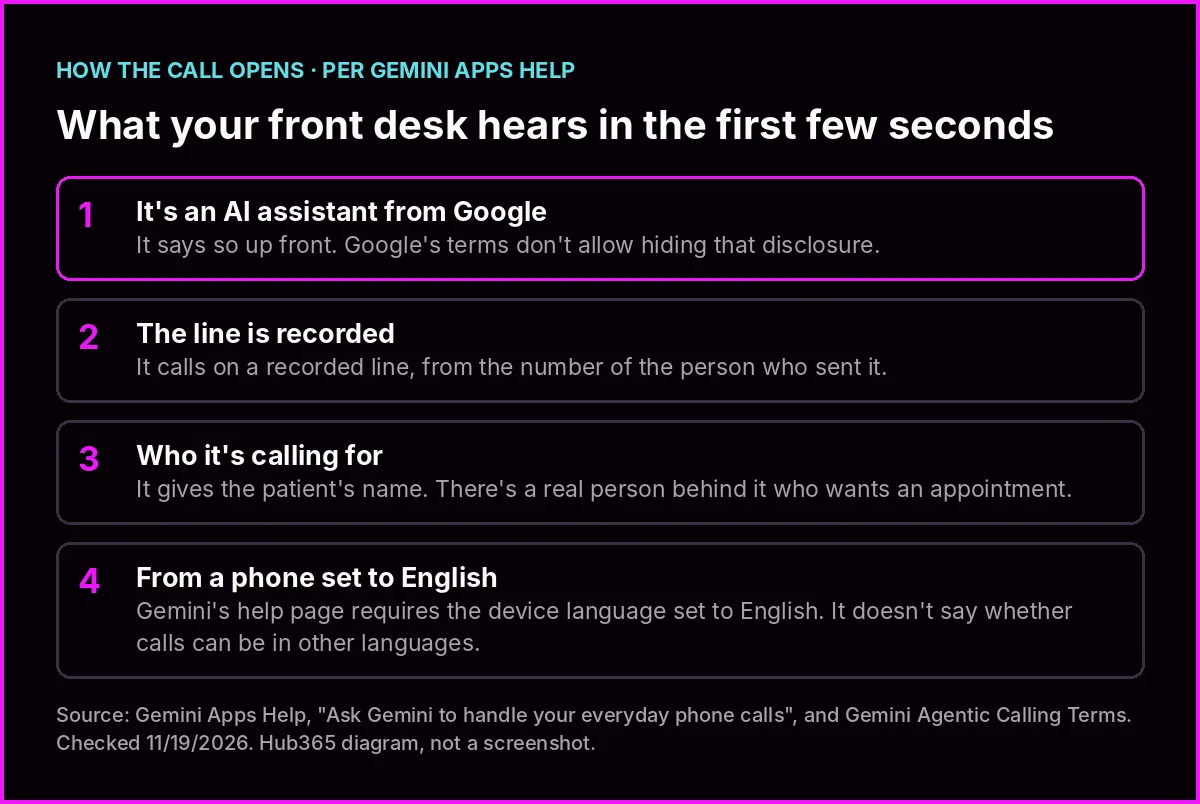
What Gemini's help page says about how every call starts. Hub365 diagram.
If your front desk hangs up, the appointment goes to the next practice on the list
Hanging up on an automated voice is a fair reflex: plenty of them call a business to sell it something. This one is different. There's a named person behind it who wants an appointment with you. It's the flip side of what your own AI agent answers at 11 p.m.: this time the assistant is working for the patient. And if the call drops, the assistant has other practices on its Maps list.
One more detail that matters in South Florida: Google requires the caller's phone to be set to English and doesn't say whether calls can happen in other languages. If your front desk works mostly in Spanish, the line that decides the call will most likely arrive in the language they're less comfortable in.
3. There's information the assistant can't give over the phone, and some practices ask for it before booking
Google draws a hard line here. The help page says calls can't relay Social Security numbers, financial information, passwords or health information, and that Gemini can't make payments or share sensitive financial details like a card number. The terms of use repeat that the feature isn't to be used to transmit personal or sensitive health data.
Before the call, the user reviews a summary with the number Gemini will dial and the details it will share, like their name and contact info. During the call they can follow a live transcript or take over.
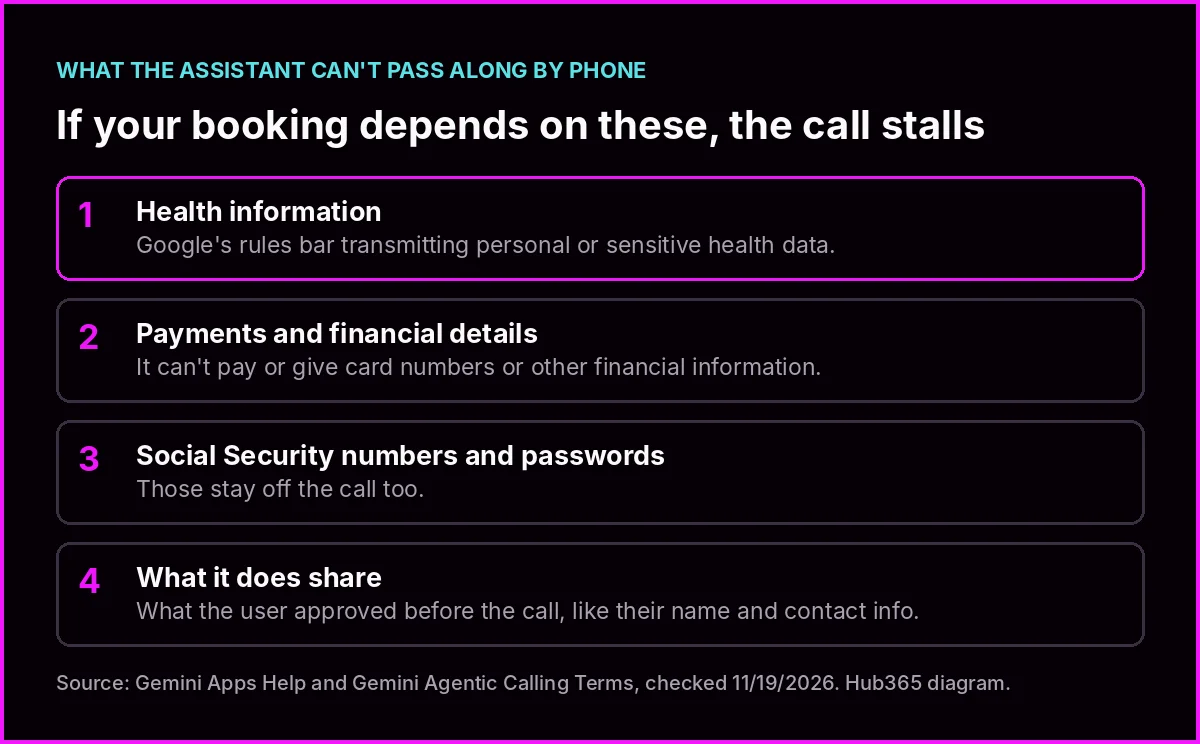
What Google's rules keep out of a call. Hub365 diagram.
If booking requires health details, the call can stall before there's an appointment
If your practice won't hold a new-patient slot without the reason for the visit (health information the assistant can't pass along), pay attention here. Google doesn't say whether it can give a date of birth or insurance details. With a person on the line, that works. With an assistant that can't pass along health information, the conversation stalls right there.
We're not telling you to change your intake process or anything you're required to collect. We're saying decide ahead of time which appointment you can hold with just a name and a phone number, and how you'll collect the rest later, when you talk to the patient. If you're unsure what you can ask for or share over the phone, that's a question for whoever handles your compliance, not a blog.
4. Your Google profile already decides whether Google calls your practice for patients
Besides Gemini, Google runs another service that already calls businesses, and that one is controlled from your profile. Business Profile help, which doesn't mention Gemini, explains that Google may place automated calls and send texts to the number on your listing for three reasons: bookings and inquiries on customers' behalf, confirming details like hours and services, and posting what it learned in those conversations to your profile. When it posts something, you get an email. Google says these calls are monitored and recorded for quality. And if you work with an online booking provider, Google may book through that partner instead of calling you.
The three toggles live at business.google.com, under More, Business Profile settings and Advanced settings, in the section called Google automated calls and text messages:
- Bookings and inquiries from customers.
- Keep your profile up to date.
- Post to your profile on your behalf.
These toggles belong to that service; for Gemini calls, Google has a separate page: g.co/gemini/opt-out. Your business has to be verified to change them. Google also notes that even with everything off, someone from Google may still call manually now and then to confirm your details.
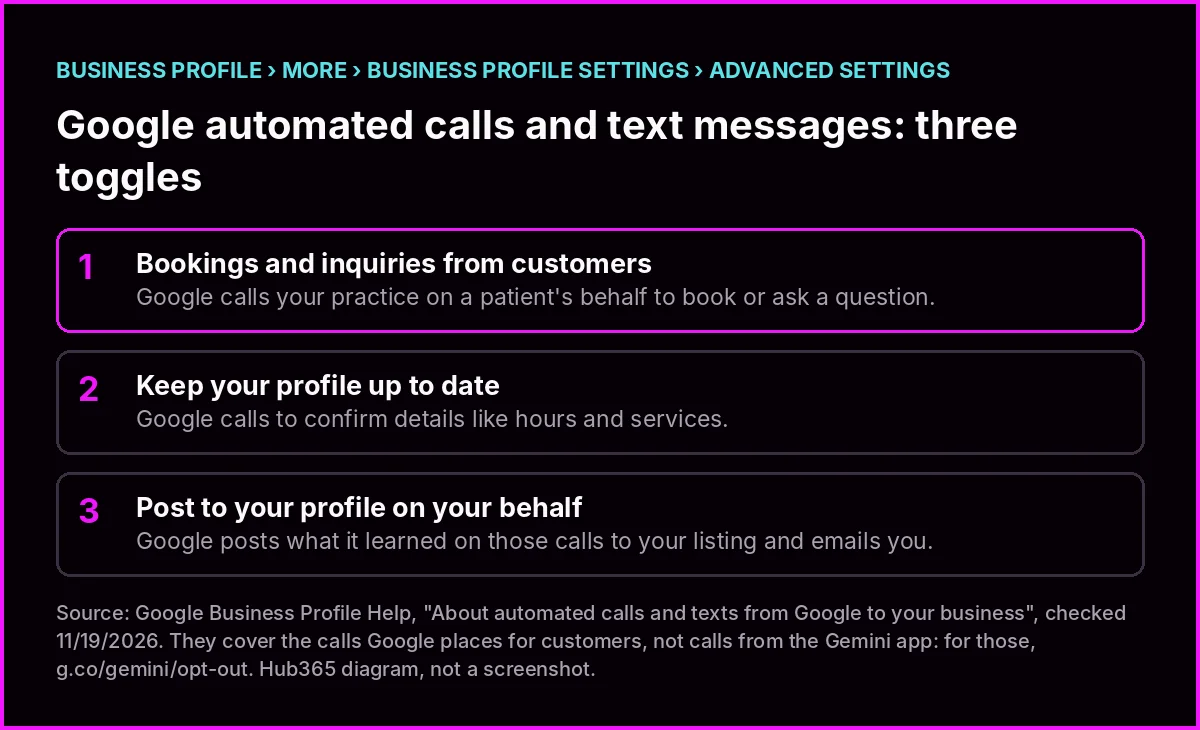
Where they are and what each one does, per Business Profile help. Hub365 diagram, not a screenshot.
Turning it off can be the right call, as long as it's a call you made
Some practices don't want bookings coming in this way, and that's a legitimate choice. Others don't want to miss a single one. What's hard to defend is not knowing the toggles exist and finding out when Google posts hours to your listing that somebody told it over the phone.
One more thing: in the announcement's example, the assistant found the dealerships on Google Maps. If your Google hours don't match your real hours, the assistant calls when nobody's there to answer, or skips the hour when someone would have. It's the same old problem of information AI can't cite, now with the phone ringing.
5. The note by the phone: four answers that fit on a sticky note
Here's today's tool. Four questions, each one fixed in a minute or less. When you're done, the four answers fit on a note taped next to the front-desk phone.
1. Do your Google hours match the hours on your door? Fix: pull up your listing in Google Maps on your phone and compare. If they don't match, correct them in your profile right there.
2. Does your front desk know what to do when a call opens by saying it's an AI assistant from Google? Fix: write one line on the note: "It's an assistant calling for a patient. Not a sales call. Treat it like any booking request."
3. Which appointment can you hold with just a name and a phone number? Fix: write down which one (a cleaning or a first visit, for example) and what you'll ask the patient for afterward, when they call or text.
4. Do you know how your three Google automated-call toggles are set? Fix: open Advanced settings in your profile, look at them, and write down whether each one is on or off, with the date. If you also don't want Gemini calls, the page is g.co/gemini/opt-out.
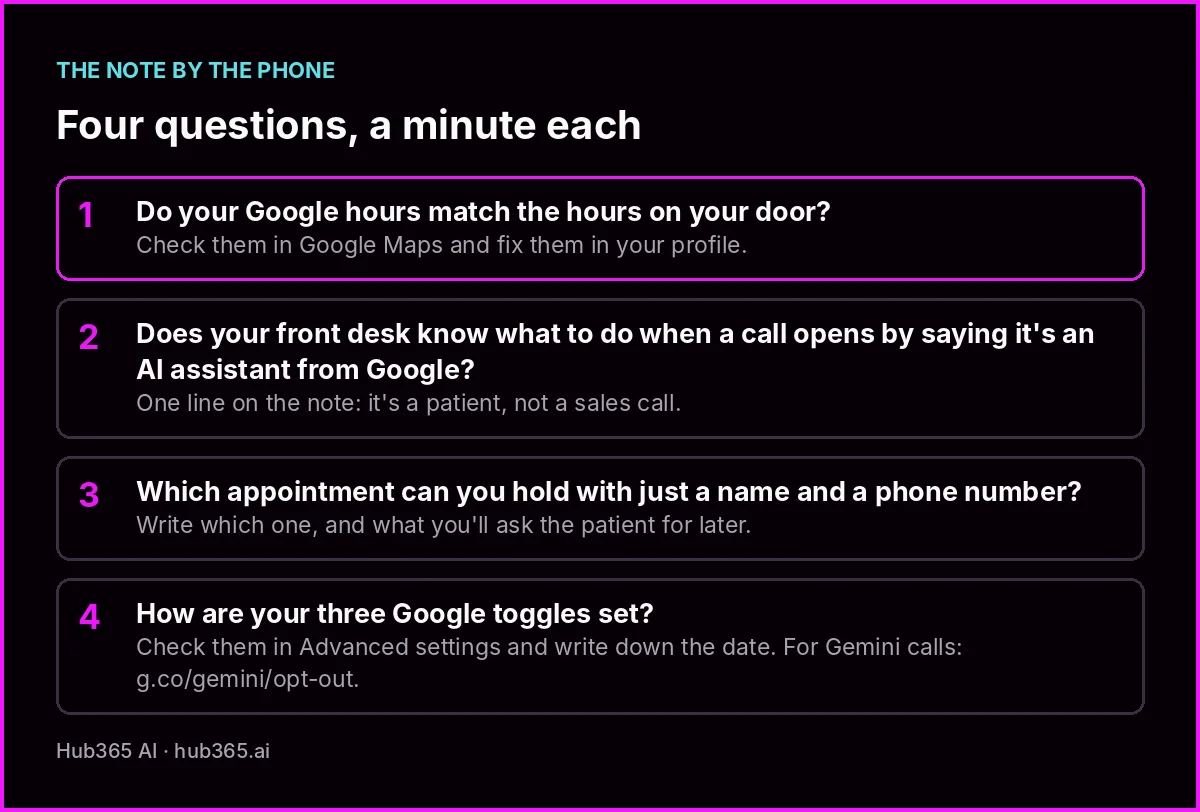
The full note. Print it or copy it by hand.
The note doesn't depend on any tool of ours. It works for any business that books by phone, ours included, and it's worth rechecking whenever Google changes any of this.
The front desk nobody trained for a polite robot
The one thing this week
Just one: the note by the phone.
- Grab a sheet of paper or a sticky note and write down the four questions from section 5.
- Answer each in one line. The fourth one sends you into your Google profile; it takes a minute.
- Tape it next to the front-desk phone and read it with whoever answers. If more than one person covers the desk, everyone reads it.
To close
The headline sounds big and the work is small. You don't need a new system or a budget line. You need the person who answers the phone to know that a polite voice, probably in English, may be bringing a patient, and someone at the practice to have looked at three toggles in the Google profile.
What does change is who's making the call. Some appointments will be requested by an assistant on your patients' behalf, following rules that aren't yours and without your context.
A front desk that hangs up on autopilot isn't just hanging up on salespeople anymore.
Want to look at how your practice answers today, on the phone and on Google?
Thanks for spending another Thursday with us. If someone at your front desk has already taken one of these calls, tell us how it went. We'd love to hear.
Keep reading
- Ask AI a vague question and the list reshuffles. Ask it your customer's question and it names whoever already answered it - yesterday's hero, the written question
- What your AI agent answers at 11pm, and what it leaves to a person - your own assistant, on the other side
- AI doesn't guess, it skips you - why your details need to be citable
- Business Profile Help: About automated calls and texts from Google - the official source for the three toggles
Sources
- Google, Gemini blog, "Tasks in Gemini" (free Tasks announcement and calling example), November 17, 2026 - https://blog.google/innovation-and-ai/products/gemini-app/tasks-in-gemini-free-new-features/
- Gemini Apps Help, "Ask Gemini to handle your everyday phone calls" (what it can do, opening disclosure, requirements, what it won't share), checked November 19, 2026 - https://support.google.com/gemini/answer/18336420
- Google, "Gemini Apps Agentic Calling Additional Terms of Service" (mandatory disclosure, no health data), checked November 19, 2026 - https://policies.google.com/terms/generative-ai/gemini-agentic-calling?hl=en
- Google Business Profile Help, "About automated calls and texts from Google to your business" (reasons, recording, the three toggles, how to turn them off), checked November 19, 2026 - https://support.google.com/business/answer/7690269?hl=en
- TechCrunch, "Google expands access to Gemini Tasks, which can help with calls, purchases", November 17, 2026 - https://techcrunch.com/2026/11/17/google-expands-access-to-gemini-tasks-which-can-help-with-calls-purchases/