



Claude now builds spreadsheets and whiteboards: we tested it on a sample charter
In short
- Since November 10, Claude can build spreadsheets (Sheets) and whiteboards (Whiteboards) right in the chat, in beta on all paid plans.
- We tested it today on our own account: a bookings sheet for a fishing charter came back with formulas and color-coded drop-downs in under a minute.
- The total also counted the canceled booking. Claude pointed it out itself and fixed it when we asked.
- A four-week launch board came back complete, with a date on every task, but it picked the dates because we didn't give it any.
- By the end you'll have the two prompts we used and three questions to check whatever Claude builds for you.
Claude Sheets is a spreadsheet Claude builds and edits with you inside the chat: you describe what you need and it shows up next to the conversation, with formulas, colors and drop-down lists. Claude Whiteboards is a board where it turns a plan into a layout with weeks, owners and dates. Both are in beta on Claude's paid plans. They're for the owner who still builds bookings, budgets or plans by hand in a blank spreadsheet.
This Tuesday we planned to cover a different tool, Claude Meetings, which we covered in Monday's AI roundup. When we went to test it, it wasn't available on our account yet, and we don't recommend anything we haven't used. So we went with what was already switched on.
It turned out to be something plenty of small businesses still do by hand: the spreadsheet. The bookings sheet someone started two years ago, the budget nobody can follow, the plan that lives in a group text. We gave Claude two jobs for a sample business, a fishing charter in Fort Lauderdale with made-up data, and here's what came back.
What actually changed
On November 10, 2026, Anthropic launched Claude Sheets and Claude Whiteboards in beta. Per the announcement, Claude generates spreadsheets from a request, with tabs, formulas, formatting and drop-downs, and marks every edit so you can see what changed. Per Anthropic, sheets can be shared and exported to .xlsx or CSV.
Whiteboards is a shared board where Claude turns a plan into a layout with a timeline, owners and dates. Per Anthropic, the team adds notes in real time and, in a retro, Claude can group them by theme and draft action items for each person; it also says a board can become a doc or a deck, or move to Lucid, Miro or Vani by Zoho. We didn't test any of that with another person.
Per Anthropic, both work on the web, the desktop app and mobile, and both are on every paid plan: on by default on Team, and on Enterprise an admin turns them on under Artifacts in the organization settings. We only tested them on the web.
How to use it, step by step (the way we did it)
We ran this on November 17, 2026, on our Team account at claude.ai, with the prompts in English.
The spreadsheet
-
Open a new chat at claude.ai. There's no separate button: you ask for it in the chat.
-
Ask for the sheet and use the word "Sheets." Say which columns you want, what gets calculated and which columns are pick-lists. Our full prompt is below.
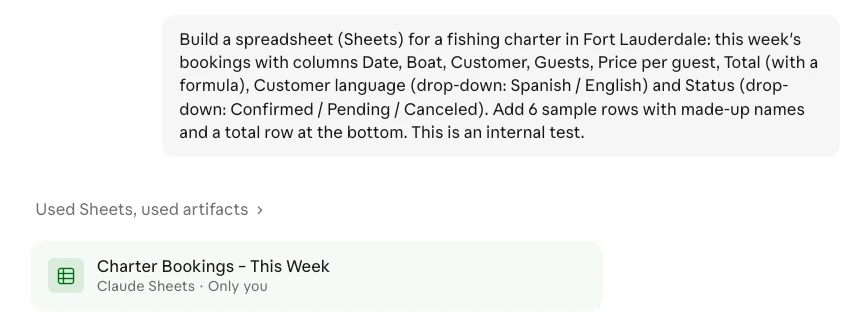
Our prompt in the chat and the sheet card marked "Only you." Test run, November 17, 2026.
-
Wait for it to appear on the right, and read Claude's message. Ours took under a minute. The chat shows a card with the sheet's name marked "Only you": out of the gate, nobody else can see it. Below it, Claude explains what it built.
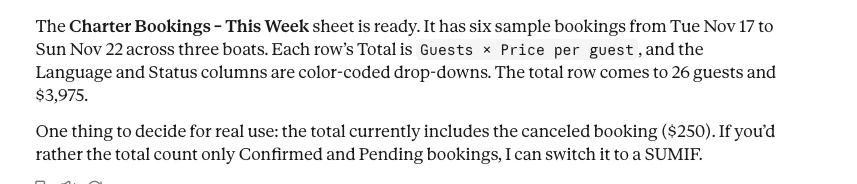
The message Claude sent with the sheet. The second paragraph points out what the total includes.
-
Click a total cell to see the formula. It shows in the bar at the top. Ours was =SUM(F2:F7), meaning it added up every booking, canceled one included.
-
Ask for changes in the chat. We asked it to leave canceled bookings out of the total. It switched to =SUMIF(H2:H7,"<>Canceled",F2:F7), and the guests total changed the same way. In the chat it explained both changes.
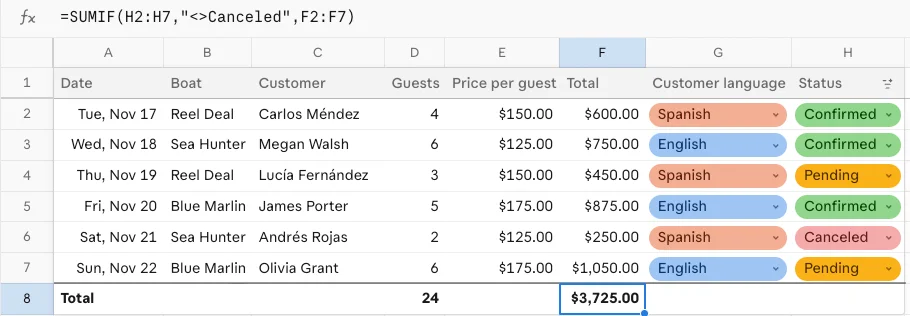
The sheet after the fix: the formula at the top now leaves the canceled booking out. $3,725 and 24 guests.
-
Check the menu on the sheet's name. The arrow next to the title shows, among other options, Share and Export. We didn't try them; per Anthropic, they're for sharing the sheet and exporting it to .xlsx or CSV.
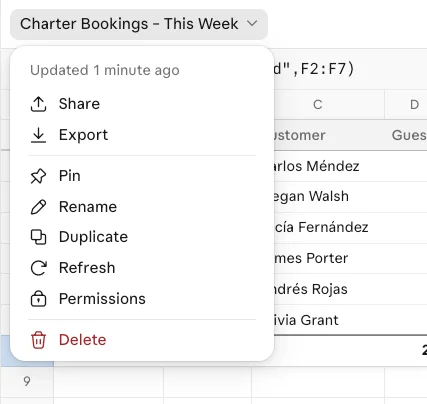
The menu that opens from the sheet's name.
The whiteboard
-
In a new chat, ask for the board and use the word "Whiteboard." Say what the plan is, how many weeks and who owns what.
-
Wait for it to build. Ours took under two minutes: an empty grid shows up first, then it fills in.
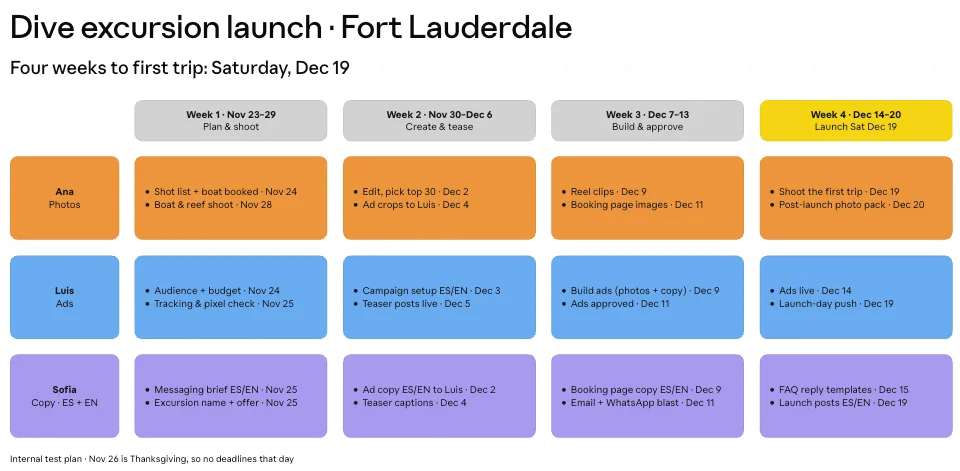
The board Claude built: one color-coded row per owner, one column per week, a date on every task and launch day highlighted.
-
Check the dates. If you don't give it any, Claude picks them, and it tells you so in the chat.
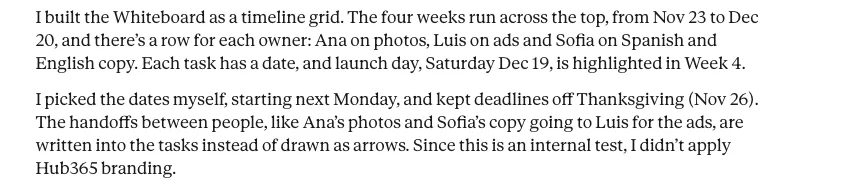
How Claude told us the dates were its own.
-
Check the toolbar at the bottom. It has text, sticky notes, shapes, drawing, comments and an "Ask Claude" button. We didn't edit the board by hand during the test.

The whiteboard toolbar.
What you take with you: the two prompts and three review questions
1. The sheet prompt (swap in your business):
Build a spreadsheet (Sheets) for a fishing charter in Fort Lauderdale: this week's bookings with columns Date, Boat, Customer, Guests, Price per guest, Total (with a formula), Customer language (drop-down: Spanish / English) and Status (drop-down: Confirmed / Pending / Canceled). Add 6 sample rows with made-up names and a total row at the bottom.
2. The whiteboard prompt:
Build a whiteboard (Whiteboard) to plan the launch of a new dive excursion in Fort Lauderdale: a 4-week timeline, owners (Ana: photos, Luis: ads, Sofia: copy in Spanish and English) and dates.
The only thing we left out of both is the closing line "This is an internal test." For yours, add real dates: we left them out on purpose to see what it would do.
3. Three questions before you use what it built:
| Question | Why | What happened in our test |
|---|---|---|
| What is the total actually adding up? | A total that counts too much looks exactly like a correct one | It counted the canceled booking: $3,975 instead of $3,725 |
| Are the dates yours, or did it pick them? | If you don't give dates, Claude fills them in | On the board it picked every date and said so in the chat |
| Who can see it? | It starts private; sharing is a separate step | Both were marked "Only you" |
What we learned using it
- Claude pointed out the issue itself. When it delivered the sheet, it wrote that the total "currently includes the canceled booking ($250)" and offered to change it. It didn't bury it. You still have to read the whole message, not just glance at the sheet.
- It works in your language. We ran the same two requests once in English and once in Spanish. Each time, headers, drop-downs and notes came back in the language we asked in, and each drop-down option had its own color.
- It explains its edits. After the fix, Claude spelled out in the chat that both totals had changed and why. You know what it touched without rechecking the whole sheet.
- The board added a useful detail we didn't ask for: it kept every deadline off Thanksgiving, November 26.
- Both come out better with real numbers and dates. Whatever you leave out, it fills in.
What it does badly, or doesn't do yet
Formulas are basic for now: Anthropic says in its announcement that sheets have simple spreadsheet functionality for the moment and that more is coming. Our test used multiplication, a sum and a conditional sum, and they worked. When you need everything Excel does, Anthropic suggests exporting to .xlsx or CSV. We saw the Export option, but we didn't open an exported file, so we can't tell you how it comes out. It's still worth having: we've written about why you want to be able to take your work out of any tool.
The real risk is the total that counts too much. The sheet looked polished, colors and all, and the total was off by $250.
And it's a beta. What you see here is what it did on November 17; it may change.
Who should skip it
Per Anthropic, it's on paid plans; the free plan isn't on that list. If your business already runs on an Excel file with complex formulas, this won't replace it; it's better for starting something new fast than for migrating what already works.
Where it fits in your business
For a charter, a marina or a dive shop, the weekly bookings sheet is exactly what we tested: who's going out, how many people, what you're charging and which language to serve them in. We didn't test it for real estate, but a showings-by-listing sheet with a buyer-language column has the same structure as the bookings one.
We tested the whiteboard on a four-week launch with three owners: instead of a long message in the group chat, we got a board showing who does what and when. If the plan comes out of a meeting, start with how to pull the action items out of any meeting with AI before it goes on the board.
The one thing to do this week
- Pick one spreadsheet you build by hand today: bookings, quotes or the monthly budget (2 minutes).
- Ask Claude for it with the prompt above, swapping in your own columns and real data (5 minutes).
- Run the three review questions before you use it (3 minutes).
Keep reading
- This week's AI roundup, November 16 · what happened November 9 to 13
- If your AI tool changes tomorrow, what do you still own? · why it pays to be able to export what you build
- How to pull the action items out of any meeting with AI · another way to organize what your team decides
- Introducing Claude Whiteboards, Claude Sheets, and Claude Data, Anthropic · the official announcement
Frequently asked questions
To close
Build the sheet in a minute; check the total before you use it.
Thanks for reading, and for making it this far on a Tuesday.
Sources
- Introducing Claude Whiteboards, Claude Sheets, and Claude Data, Anthropic, November 10, 2026, checked November 17, 2026 · https://claude.com/resources/articles/sheets-whiteboards-data
- Hub365 AI's own test on its Claude Team account, November 17, 2026